Diners Decide Before They Arrive
Think about how you chose the last place you ate. Somebody said "let's get food", a phone came out, and within a minute or two the options had narrowed to two or three places. Nobody walked down the street reading menus in windows. The decision was made on a screen, usually from the Google results or the map.
That is the reality for every restaurant, café, shisanyama, pizza place and takeaway in South Africa now. Searches like "restaurants near me", "takeaways open now", "best burgers in Centurion" or "halaal food Durban North" are bottom-of-the-funnel in the purest sense: the person is hungry, has money, and wants to act in the next hour. Few searches in any industry are closer to the till.
Yet a surprising number of food businesses send that traffic to a Facebook page that hasn't been updated since winter, a menu that's a blurry photo of a laminated card, or nothing at all. The diner can't see prices, can't tell if you're open, and can't order without phoning a number that rings out during the lunch rush. So they go back to the results.
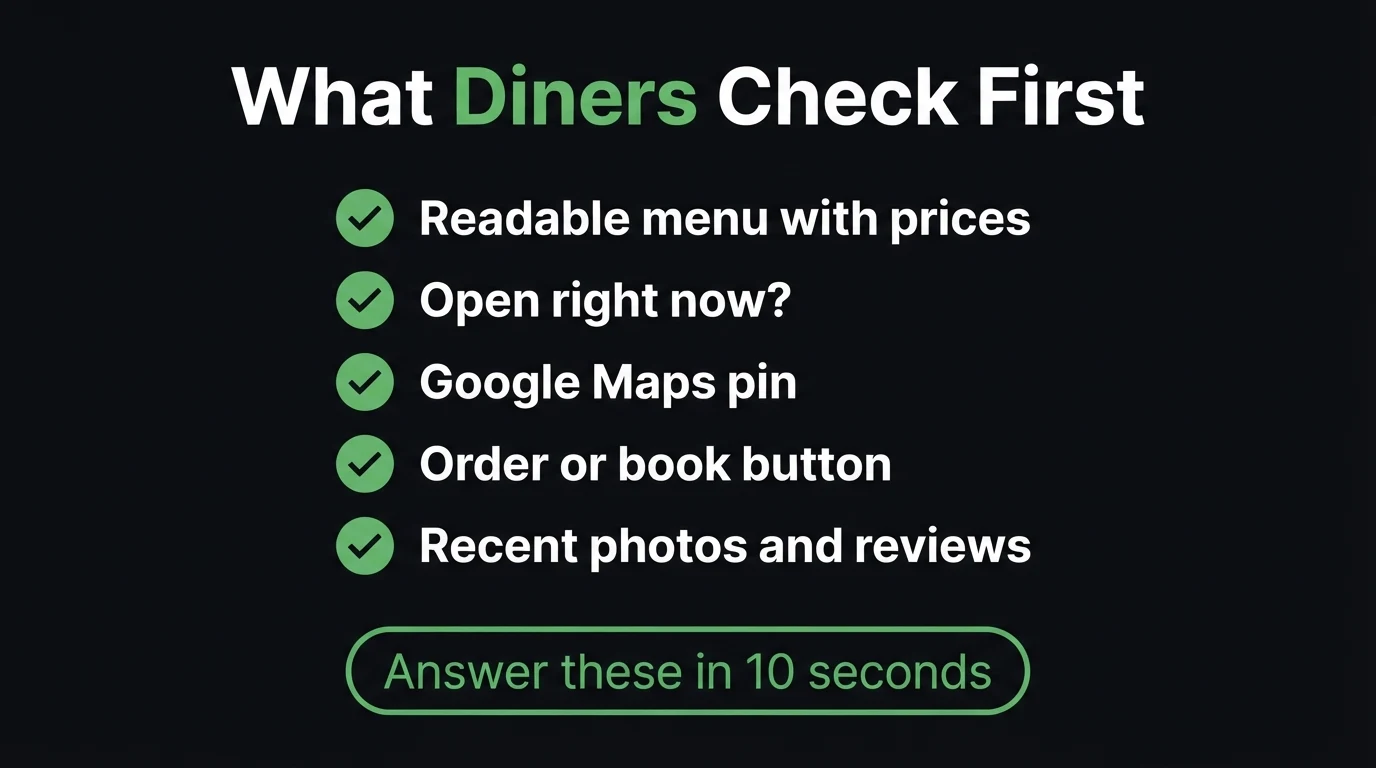
The Five Questions Your Site Must Answer in Ten Seconds
1. "What do they serve, and what does it cost?"
This is the big one. The visitor wants to scan the menu with prices, on a small screen, with one thumb. A typed web menu does that. A PDF has to download and then be pinched and zoomed. A photo of your printed menu is worse: it's often unreadable on a phone, it can't be found by Google, and the moment you change a price it's out of date. Put the menu on the page as text, grouped into short sections (starters, mains, combos, sides, drinks), with prices next to each item. Mark the specials and the bestsellers so people don't have to read everything.
2. "Are they open right now?"
A takeaway that shows "Mon–Sun 10:00–21:00" when it actually closes at 20:00 on Sundays is training customers not to trust it. Put your real hours on the site and keep them identical to your Google Business Profile. Public holidays, Ramadan or Diwali hours, and the week you close for the December break are exactly when people check, and exactly when out-of-date hours cost you a wasted trip and a bad review.
3. "Where exactly are they, and can I park?"
Embed a Google Maps pin, write out the address in full, and add the small details that save a phone call: which entrance in the centre, whether there's parking or a drop-off zone, and whether you're on the ground floor. Restaurants inside malls and complexes lose people every day because Maps sends them to the wrong side of the building.
4. "How do I order or book?"
Give one obvious action. For a takeaway that might be "Order on WhatsApp"; for a sit-down restaurant, "Book a table". Pre-fill the WhatsApp message ("Hi, I'd like to place an order for collection") so the customer only has to add what they want. Our guide to turning website visitors into WhatsApp leads covers button placement in detail; on a food site, the button should be visible without scrolling on every page.
5. "Is the food actually good?"
Real photos of your own dishes, your own counter and your own team do more than any stock image of a perfectly lit steak. Customers can smell a stock photo, and it makes them wonder what the real food looks like. Pair your photos with recent Google reviews. If you're short on reviews, our guide to getting your first Google reviews has a simple script you can use at the till.
Quick test: open your own website on your phone, on mobile data, and try to find the price of your most popular dish. How many taps did it take?
The Menu Problem: Why a Photo of Your Menu Costs You Customers
If you only fix one thing after reading this, fix the menu. It's the most-visited part of any food business's website, and it's the part most often done badly.
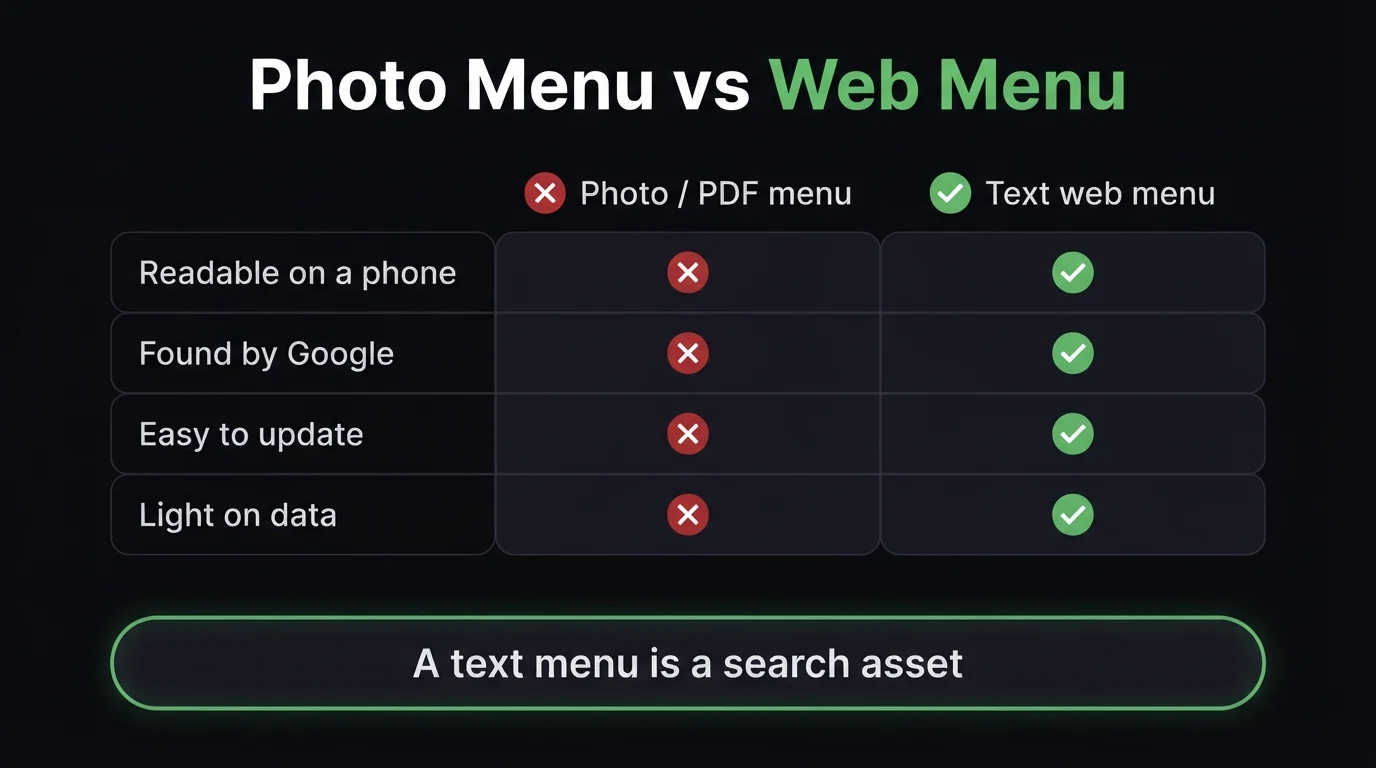
Google can read text, not photos of text. When someone searches "lamb curry bunny chow Durban" or "vegan pizza Pretoria East", Google can only match your restaurant if those words exist on your page. A photo menu is invisible to that search. A text menu turns every dish into a small search term working for you.
It's lighter on data. Many of your customers are browsing on prepaid data. A large PDF or a set of high-resolution menu photos can take a long time to load on a weak signal, and people won't wait. We explain why this matters in mobile-first website design: for a food business, most visitors never see the desktop version at all.
It's easier to keep current. Prices change. Load-shedding changes what you can cook. A text menu on a well-built site takes minutes to update, so customers don't arrive expecting the R89 special that's now R99, which is a small thing that starts a lot of bad reviews.
It's where AI search looks. More people now ask ChatGPT or Google's AI Overviews "where can I get good halaal burgers near Sandton?". Those tools pull answers from pages with clear, structured text. A properly built restaurant site can also tell search engines, in code they understand, that you are a restaurant, what cuisine you serve, your hours and your price range. A Facebook post or a photo menu can't do that.
Dine-In vs Takeaway: Two Customers, Two Different Pages
Many food businesses do both, but the person planning Friday dinner and the person who wants lunch in 20 minutes are looking for different things.
- "What's the vibe? Is it good for a date or a family?"
- "Can I book, and do they take groups?"
- "Is there a kids' menu or a play area?"
- "Do they have a liquor licence, or is it bring-your-own?"
- "Is there backup power if the lights go out?"
- "What's on the menu and how much?"
- "Are they open right now?"
- "Do they deliver to me, or is it collection only?"
- "How long will it take?"
- "Can I just WhatsApp my order?"
The dine-in visitor wants atmosphere and reassurance: photos of the space, booking options, a note on groups and functions. The takeaway visitor wants speed: menu, prices, hours and an order button, nothing in between. If you do both, make the home page split clearly into "Eat in" and "Order now", and let each path give that customer what they came for. A backup-power note matters more than many owners realise: during load-shedding, "we have a generator, kitchen fully running" is a reason to choose you over the place that might be dark.
Run a restaurant or takeaway? See your new site before you pay a cent.
We'll build a live demo of your food business website, with a proper text menu, your hours and Maps pin, and WhatsApp order buttons, in 48 hours. You only pay if you approve it.
Zero deposit · No lock-in · Based in Centurion, serving all of SA
Delivery Apps vs Your Own Ordering Channel
Delivery apps are useful. They bring you customers who have never heard of you, and they handle the drivers. But every order through an app comes with a commission, and the app, not you, owns the relationship with that customer. When they want your food again, they open the app, where your competitors are one swipe away.
You don't have to choose. The practical approach most independent restaurants land on is:
- Use the apps for discovery, to reach people who don't know you yet.
- Use your own website and WhatsApp for repeat customers, so the regulars order directly and you keep the full margin.
- Make the direct route worth it: a small collection discount, a loyalty stamp, or a "WhatsApp us for today's special" line on your packaging and receipts.
Your website is where that direct relationship lives. It's the address you print on the takeaway bag, the link in your Instagram bio, and the page Google shows when a regular searches your name.
For a food business, the website isn't a brochure. It's the menu board, the phone line and the booking book, open at 2am. Judge every element by one test: does it help a hungry person decide, find you, or order? Long "our story" pages and slow photo sliders fail that test. A clear menu, accurate hours and a working order button pass it.
Google Maps and "Near Me": Where Food Businesses Win or Lose
Food is the most local search there is. For "restaurants near me" or "takeaways open now", Google usually shows the map results first, and those are driven heavily by your Google Business Profile. Your profile and your website work as a pair: the profile gets you into the map, and the website closes the decision when people tap through. Our guide on Google Business Profile vs a website explains how they support each other.
A few things make a real difference for restaurants specifically:
- Pick the right primary category (for example "Indian restaurant" or "Pizza takeaway", not just "Restaurant").
- Link your profile to your website menu, so the menu link Google shows goes to your readable text menu.
- Post fresh photos regularly, especially new dishes and specials.
- Keep hours identical on your profile, your website and your delivery app listings. Conflicting hours confuse Google and annoy customers.
- Reply to reviews, including the bad ones. A calm, specific reply to a complaint often reassures readers more than the five-star reviews do.
Trust Details That Matter More Than You Think
Some details look small to the owner and decisive to the customer. Put them on the site, near the menu:
- Halaal or kosher certification, with the certifying body named. For many South African diners this is a yes-or-no filter, and vague wording loses them.
- Vegetarian, vegan and gluten-free options, clearly marked on the menu.
- An allergen note and an invitation to ask, so people with allergies feel safe enough to order.
- Delivery area and collection details, so customers don't have to phone to find out.
- Backup power, if you have it.
If you take bookings or orders through a form, you're collecting names and phone numbers, which means a privacy policy is a requirement, not a nice-to-have. Our POPIA legal pages guide explains what to include.
What a Restaurant Website Needs, and What It Can Skip
You don't need a custom ordering app or a complicated online shop on day one. Most independent food businesses get far more from a fast, simple site that nails the basics.
| Feature | Worth it? | Why |
|---|---|---|
| Text menu with prices | Essential | Readable on phones and found by Google |
| Accurate hours + Maps pin | Essential | Stops wasted trips and bad reviews |
| WhatsApp order / book button | Essential | How South Africans prefer to make contact |
| Real food and venue photos | Essential | Proof the food is worth the trip |
| Halaal, vegetarian and allergen info | Strongly recommended | A deciding filter for many diners |
| Full online ordering with payments | Later, if volume justifies it | WhatsApp ordering covers most small kitchens |
At CJX Studios, restaurant and takeaway websites sit on the same monthly plans as any other business; the pricing page shows what each tier includes, and our website cost guide explains what drives the price. If you already have a site and suspect it's losing you orders, the checklist of signs your website is losing you customers is a quick self-audit.
The Bottom Line
Hungry people don't browse. They search, scan and choose, usually in under a minute and usually on a phone. The restaurant that wins isn't always the one with the best food; it's the one that makes the decision easiest. A readable menu, true hours, a Maps pin and a one-tap order button do that.
Start this week: type out your menu with prices, check that your hours match on Google and your site, and put a WhatsApp order button where nobody can miss it. That alone puts you ahead of most of the places your customers are comparing you with.
- Diners decide before they arrive, on their phone, in about a minute. Your site has to answer them fast.
- Fix the menu first: typed text with prices, not a photo or a PDF. It's readable, searchable and easy to update.
- Own your regulars: use delivery apps for discovery, and your website plus WhatsApp for repeat orders without commission.
Go Deeper: Related Guides
Frequently Asked Questions
Does a restaurant need a website if it already has a Facebook or Instagram page?
Yes. Social pages are good for showing today's special, but Google rarely ranks them for searches like "restaurants near me" or a specific dish, and posts quickly bury your menu and hours. A simple website gives you a permanent, readable menu, accurate hours and an order button that you control, and it is the link Google Maps and your social profiles should point to.
Should I put my menu on my website as a PDF or a photo?
Neither, if you can avoid it. Type the menu out as text with prices. A text menu is readable on a phone without zooming, loads quickly on mobile data, can be found by Google when someone searches for a dish, and takes minutes to update when prices change. Keep a PDF only as an optional download for people who want to print it.
Can customers order from my website without a delivery app?
Yes. The simplest option for most small kitchens is a WhatsApp order button with a pre-filled message, so customers can send their order for collection or your own delivery. If volume grows, you can add full online ordering with payments later. Many restaurants use delivery apps to reach new customers and their own site and WhatsApp for regulars, which avoids paying commission on repeat orders.
How do I get my restaurant to show up on Google Maps?
Claim and complete your Google Business Profile with the right primary category, your exact address, real hours, photos and a link to your website menu. Ask happy customers for reviews and reply to them. Keep your hours identical on your profile, your website and any delivery apps, because conflicting information confuses both Google and diners.
How much does a restaurant website cost in South Africa?
At CJX Studios, restaurant and takeaway websites start from R1,200 per month with hosting, maintenance and support included, and no deposit before you approve a free 48-hour live demo. Most food businesses do not need a custom ordering app on day one; a fast site with a text menu, accurate hours, a Maps pin and WhatsApp order buttons does the heavy lifting.

Chris Maboyi
I build websites for South African businesses in Centurion, Pretoria and across Gauteng, including local, walk-in businesses where the customer decides on their phone, like restaurants, takeaways and salons. Every project starts with a 48-hour free demo: real, live, no deposit before you approve it. Get in touch or WhatsApp me directly.