What Mobile-First Actually Means (and What It Doesn't)
"Mobile-friendly" and "mobile-first" sound the same, but they describe opposite processes. A mobile-friendly site was designed for a desktop and then made to fit on a phone — columns stack, images shrink, the menu collapses into a hamburger. Technically it works. A mobile-first site was planned on a phone-sized canvas from the start: what does someone standing in a parking lot need to see, in what order, and what do they tap? The desktop version is the expansion, not the original.
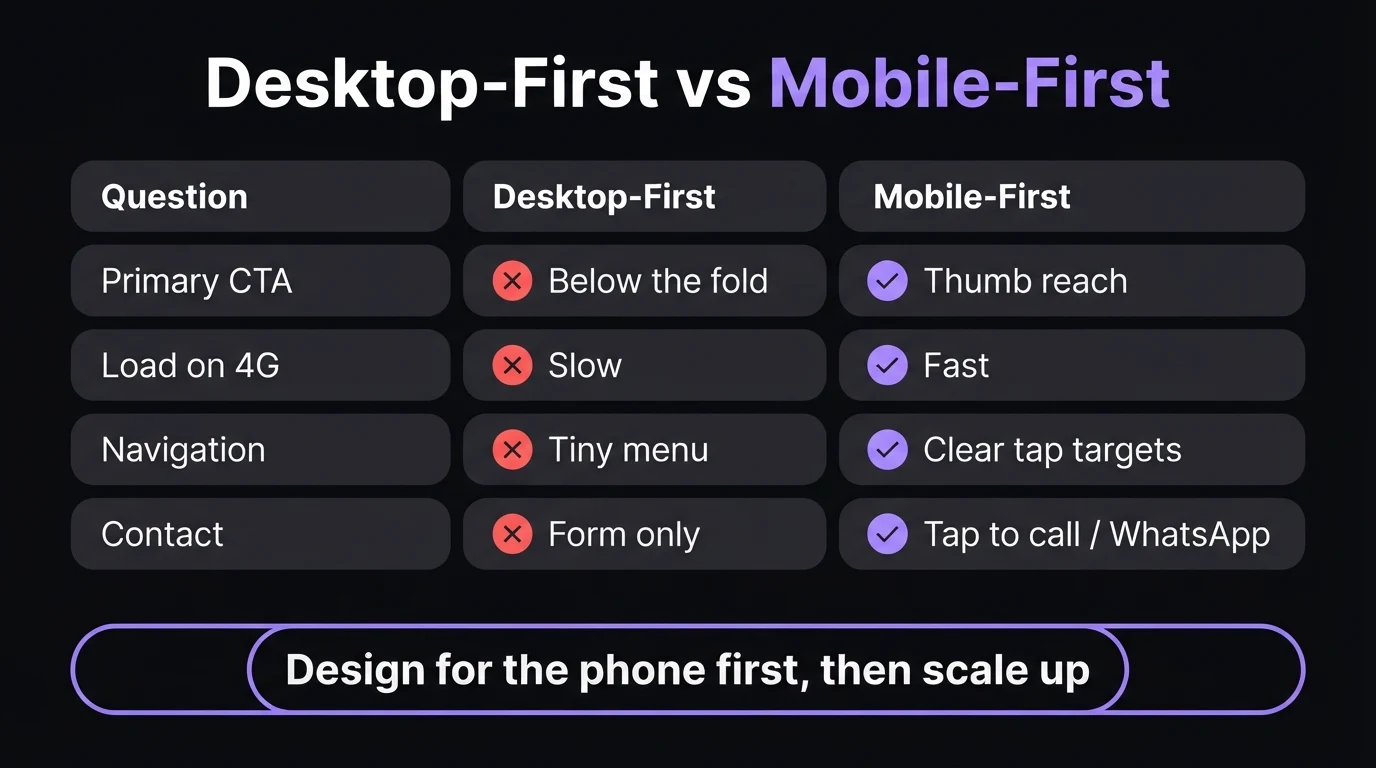
The difference shows up in decisions, not in code. On a desktop-first site, the phone number lives in the footer because there was "room in the header for the menu." The hero is a wide image with text overlaid on the left, which on a phone becomes a cropped face and three lines of unreadable copy. The contact form has nine fields because nobody had to fill it in with a thumb. None of that is broken — it's just designed for someone who isn't there.
And here's the part most business owners never notice: you probably check your own website on a laptop. So does your designer. So the version that gets reviewed, approved and admired is the one your customers rarely see.
Why Your Customers Are Almost All on Phones
Public browser-share trackers like StatCounter have shown phones carrying the majority of South African web traffic for years, and for local service businesses the share is usually higher than the national average. That makes sense once you picture the actual moment of search: a geyser bursts, a tyre goes flat, a child needs a tutor before exams. Nobody walks to a desktop for that. They pull out their phone.
South African conditions sharpen it further. Data is expensive relative to income, so heavy pages cost your visitors real money. Load-shedding and patchy signal mean connections drop mid-load. And WhatsApp is how most people prefer to make first contact with a business — which only works smoothly from a phone.
Don't take anyone's national average on faith — look at yours. In Google Analytics, open Reports → Tech → Tech details and switch the dimension to "Device category". For most small South African service businesses we work with, mobile is the clear majority. If yours is too, every design decision should be judged on the phone first.
There's also the Google side. Google moved to mobile-first indexing — it crawls and evaluates the mobile version of your pages and uses that to decide rankings. If content, headings or links are missing or hidden on your mobile layout, as far as Google is concerned they don't exist. A desktop-first site that hides half its content behind "read more" toggles on mobile can quietly lose rankings it never knew it had.
Quick check: when did you last open your own website on your phone, on mobile data, and try to contact yourself?
Where Desktop-First Sites Leak Leads on a Phone
When we audit small-business sites, the mobile problems are remarkably consistent. None of them look dramatic on a laptop, which is exactly why they survive for years.
- Phone number as plain text — can't be tapped
- Call-to-action buried three scrolls down
- Hero image crops out the important part
- Menu links too close together to hit
- Five-second load from uncompressed photos
- Pop-up that covers the whole screen with a tiny ✕
- Tap-to-call and WhatsApp in the first screen
- One clear headline that says what you do and where
- Images chosen and cropped for a vertical screen
- Big, well-spaced buttons a thumb can hit
- Compressed images that load on weak signal
- No pop-ups — the offer lives on the page
Each of these on its own costs a small percentage of visitors. Stacked together, they're why a site can get decent traffic and almost no enquiries. The visitor arrives, can't immediately see how to contact you, pinches and zooms for a few seconds, and goes back to Google to tap the next result — usually a competitor whose site is simpler, not better.
Five Rules for a Thumb-First Website
1. Put the action in the first screen
On a phone, the first screen is roughly a headline, one sentence and one or two buttons. That's your entire pitch before the visitor decides to scroll or leave. It should say what you do, where you do it, and give them a one-tap way to act: call, WhatsApp, or book. A sticky bar at the bottom of the screen with "Call" and "WhatsApp" is one of the highest-return changes a service business can make — it's always within reach no matter how far someone scrolls. Our guide on turning website visitors into WhatsApp leads covers how to pre-fill that message so it actually gets sent.
2. Design for the thumb, not the mouse cursor
A mouse pointer is a few pixels wide. A thumb isn't. Apple and Google's design guidelines both recommend touch targets of roughly 44–48 pixels, with space between them. Menu links squeezed together, tiny "×" buttons and text links inside paragraphs are where mis-taps happen — and every mis-tap is a moment of frustration. Put the most important buttons in the lower half of the screen where thumbs naturally rest.
3. Write shorter, stack cleaner
A paragraph that looks like three tidy lines on a laptop becomes a twelve-line wall on a phone. Mobile-first copy uses short paragraphs, descriptive subheadings, and lists where there's a genuine list. It's not about dumbing down — it's about letting someone skim to the bit they need. If the answer to "Do you work in my area?" is hidden in paragraph four, most phone visitors won't find it.
4. Treat speed as a design decision
Speed isn't something you bolt on at the end. It's decided when you choose a full-screen background video, a slider with eight high-resolution photos, or three different font families. On mobile data in a weak-signal area, those choices are the difference between a page that loads in two seconds and one that never finishes. Modern image formats like WebP, sensibly sized photos and minimal scripts do most of the work. The specific thresholds Google measures are explained in our Core Web Vitals guide.
5. Make forms short enough to finish with one hand
Every field you add to a contact form costs completions on a phone. Name, number and a short message is enough for most service enquiries — you can ask the rest in the follow-up conversation. Use the right keyboard for each field (a number pad for phone numbers, an email keyboard for email), and never make someone fill in a form when a WhatsApp button would do the same job in one tap.
Want to see your business designed for the phone first?
We'll build a live, mobile-first demo of your website — tap-to-call, WhatsApp, fast-loading pages and a first screen that sells — in 48 hours. You only pay if you approve it.
Zero deposit · No lock-in · Based in Centurion, serving all of SA
The 60-Second Phone Test You Can Run Today
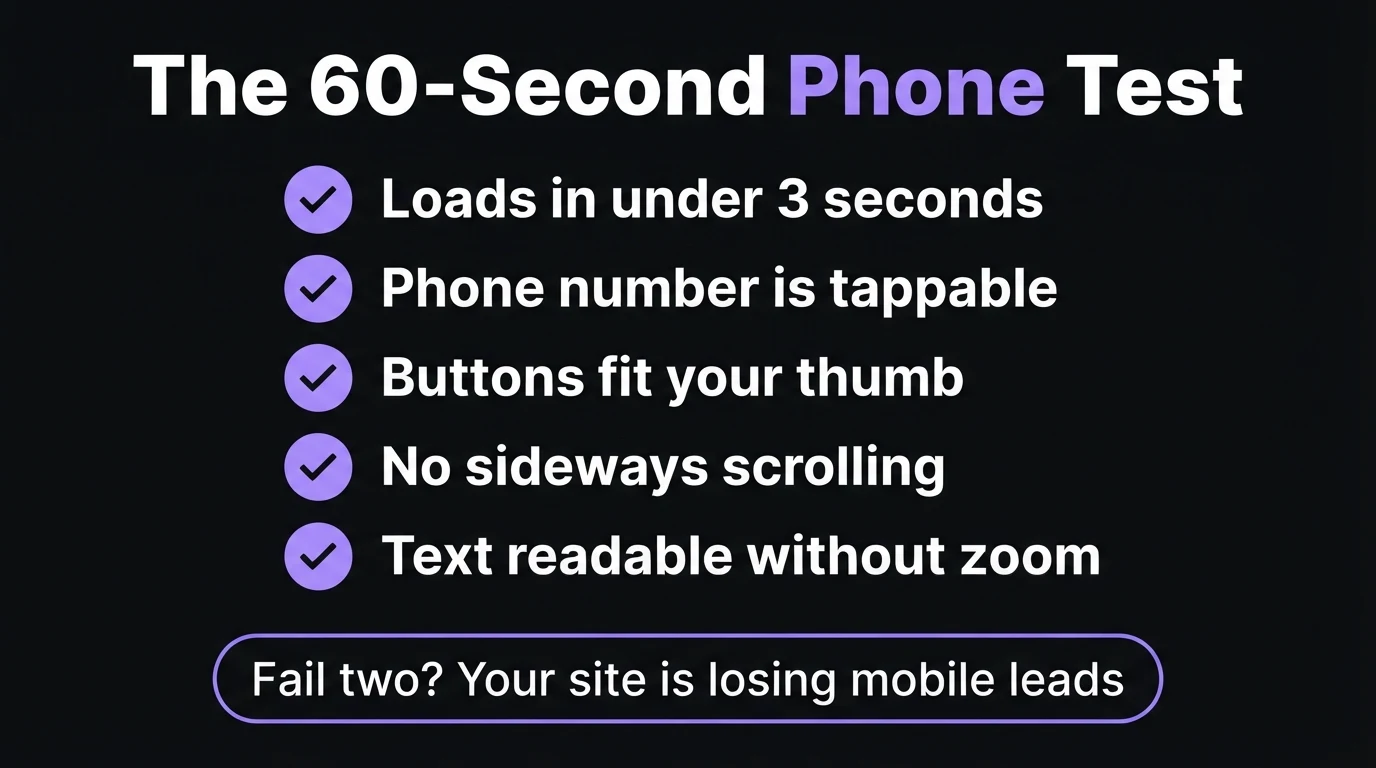
You don't need a tool or a developer to find out whether your site has a mobile problem. Turn off Wi-Fi, open your website on your phone using mobile data, and go through this list honestly:
- Does it load in under about three seconds? Count it out. If you're staring at a blank or half-built page, so are your customers.
- Can you tap the phone number and have it dial? If it just highlights the text, that's a lost call every time.
- Can you hit every button first time with your thumb? Try the menu, the contact button and any links in the footer.
- Does anything scroll sideways? A table, an image or an embedded map that's wider than the screen makes the whole page feel broken.
- Can you read everything without zooming? If you're pinching to read your own prices or service list, the text is too small.
Does Desktop Still Matter?
Yes — just not first. Some visitors genuinely prefer a big screen: procurement managers comparing suppliers, people reading a detailed quote or long article, B2B buyers researching during office hours. If you sell to other businesses, your desktop share may be meaningfully higher than a plumber's or a hair salon's.
Mobile-first doesn't mean desktop-ugly. It means you solve the hardest version of the problem — small screen, slow connection, one thumb, short attention — and then use the extra space on desktop to add comfort: wider layouts, side-by-side comparisons, larger imagery. Going the other way, from a rich desktop layout down to a phone, almost always means cutting things clumsily. Building up is cleaner than squeezing down.
| Business type | Typical device mix | Design priority |
|---|---|---|
| Trades & emergency services | Heavily mobile | Tap-to-call above everything |
| Salons, clinics, restaurants | Mostly mobile | Booking, hours, maps, WhatsApp |
| Professional services | Mixed | Trust signals readable on both |
| B2B suppliers | More desktop during work hours | Mobile-first, with richer desktop detail |
Whatever your mix, the starting point is the same. If you're planning a new site, our guide to landing pages versus homepages explains how to structure the pages your ads and searches actually send people to — and those pages are almost always viewed on a phone. And if you're weighing up doing it yourself, our DIY website design guide is honest about where builders help and where they trip people up on mobile.
The Bottom Line
Your website has two versions: the one you see on your laptop, and the one your customers actually use. For most South African small businesses, the second one is where the money is — and it's often the one nobody has properly looked at.
Run the 60-second phone test today. If your site passes, great. If it fails two or more, the fix isn't a new colour scheme or more content. It's re-thinking the site from the phone up: what someone needs to see in the first screen, and how they contact you with one tap. That's what mobile-first design is — and it's usually the cheapest conversion improvement available to you.
- Phones carry most of your traffic — and Google ranks you on your mobile version, not your desktop one.
- Mobile-first is a planning decision: design the small screen first, then expand. Squeezing a desktop site down leaks leads.
- Five rules: action in the first screen, thumb-sized buttons, short copy, speed as design, one-hand forms.
Go Deeper: Related Guides
Frequently Asked Questions
What is mobile-first design?
Mobile-first design is the practice of planning and building a website for a phone screen first, then expanding the layout for tablets and desktops. Instead of shrinking a desktop design, you decide what a phone visitor needs to see and tap first — usually what you do, where you work, and a one-tap way to call or WhatsApp — and add extra layout and detail for larger screens afterwards.
What is the difference between mobile-friendly and mobile-first?
A mobile-friendly site was designed for desktop and then adapted to fit on a phone, so it works but often buries contact buttons and key information. A mobile-first site was planned on a phone-sized screen from the start, so the content order, button sizes, image crops and page speed are all chosen for mobile visitors, with the desktop version as an expansion.
Does Google rank websites based on the mobile version?
Yes. Google uses mobile-first indexing, which means it primarily crawls and evaluates the mobile version of your pages when deciding how to rank them. Content, headings or links that are missing or hidden on your mobile layout may not count. A fast, complete mobile version is therefore important for search visibility as well as for conversions.
How can I check if my website works well on a phone?
Turn off Wi-Fi and open your site on your phone using mobile data. Check that it loads in roughly three seconds, that the phone number dials when tapped, that every button is easy to hit with your thumb, that nothing scrolls sideways, and that text is readable without zooming. Failing two or more of these means mobile visitors are likely leaving.
How much does a mobile-first website cost in South Africa?
At CJX Studios, every website is designed mobile-first and plans start from R1,200 per month, including hosting, maintenance and support. You get a free 48-hour live demo before paying anything, with no deposit before you approve it. A redesign that fixes mobile problems is often the cheapest way to get more enquiries from the traffic you already have.

Chris Maboyi
I build fast, mobile-first websites for South African businesses in Centurion, Pretoria and across Gauteng — designed on a phone screen before anything else, because that's where your customers are. Every project starts with a 48-hour free demo: real, live, no deposit before you approve it. Get in touch or WhatsApp me directly.