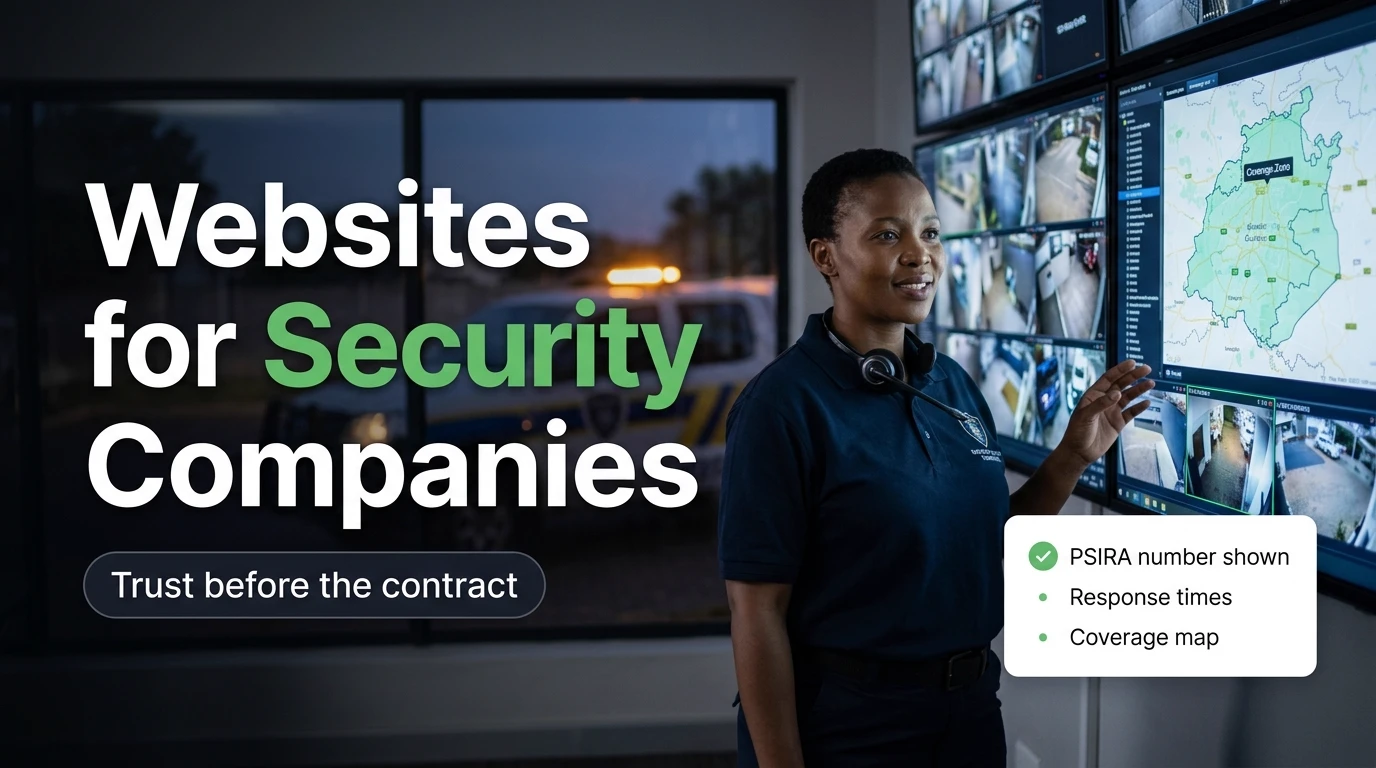
Why Security Is Bought on Trust, Not Price
Most small businesses sell something the customer can inspect before paying — a meal, a haircut, a set of kitchen cupboards. Security is different. What the client is really buying is a promise about a night that hasn't happened yet: "When the alarm goes off, someone competent will arrive, fast." They can't test that before they sign. So they look for proxies.
Is this company registered? Is it actually local, or a call centre two cities away? Does it have its own vehicles and control room, or is it subcontracting? Do real people in my area vouch for it? Every one of those questions gets asked — by the homeowner comparing armed-response providers after a break-in down the road, by the estate HOA trustee shortlisting guarding contractors, and by the facilities manager who has to justify the appointment to a landlord.
The uncomfortable truth for a lot of security operators is that the industry has a credibility problem. Every suburb has heard about the fly-by-night outfit that took a few months of fees and folded, or the guarding company whose officers weren't registered. That history makes buyers suspicious by default. Your website's job is to remove that suspicion before the first call — and price only enters the conversation once trust has been established.
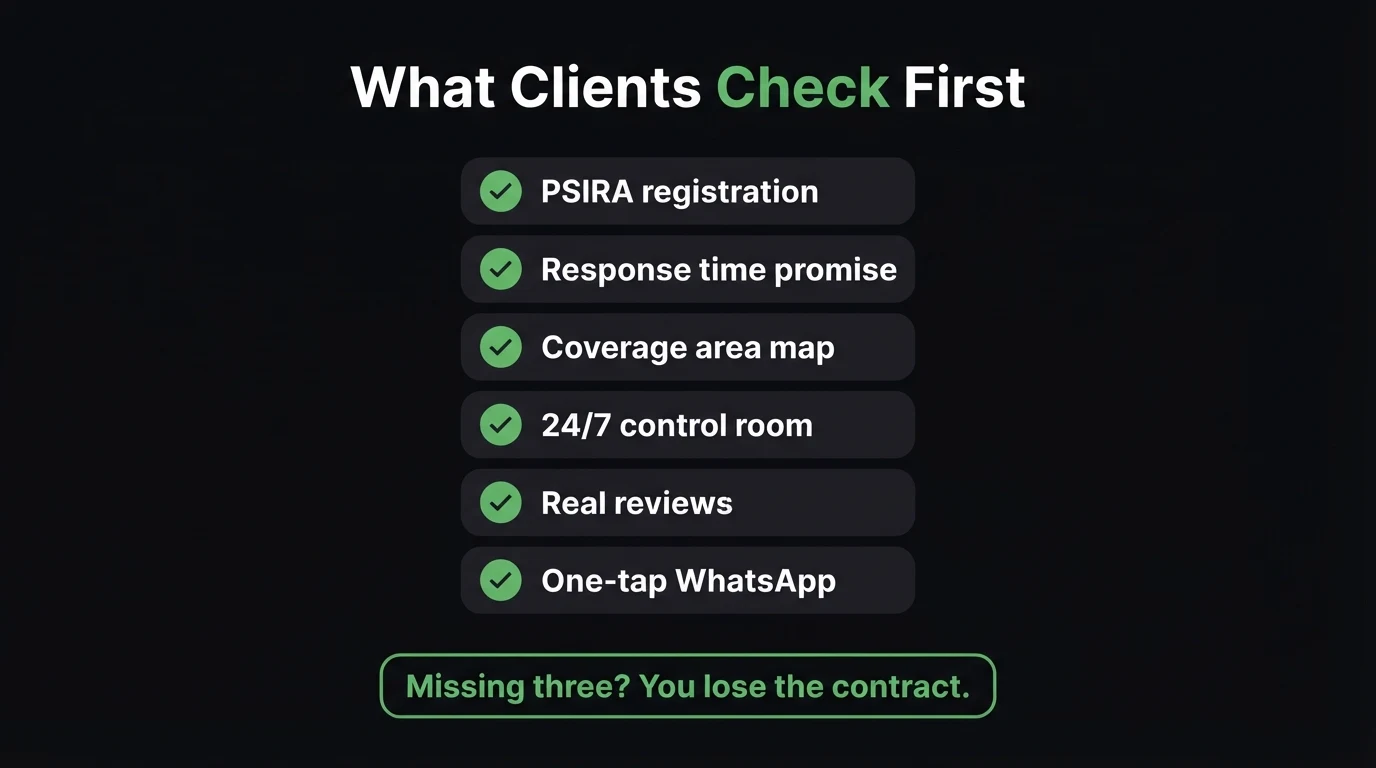
The Six Trust Signals Every Security Website Needs
1. Your PSIRA registration, shown — not implied
The Private Security Industry Regulation Act requires security service providers to be registered with PSIRA, the Private Security Industry Regulatory Authority. Careful clients know this, and PSIRA lets the public verify a registration. So don't make them dig. Put your company registration number in the footer of every page, repeat it on your About and Quote pages, and state that your officers are registered and graded. If you're a SAIDSA member or hold other industry accreditations, show them too. This is the cheapest trust signal you'll ever add, and its absence is a red flag to exactly the clients you most want.
2. A response-time promise you can actually keep
"Rapid response" means nothing. Every competitor says it. What a homeowner wants to know is roughly how long it takes for a vehicle to reach their street. Publish a realistic average for your core zones — and be honest that times vary with traffic and incident load. An achievable, specific promise beats an inflated one, because the first time you miss an exaggerated number, the client tells their whole street WhatsApp group.
3. A coverage map of the areas you really serve
This is the question that kills more enquiries than any other: "Do you even cover us?" A clear coverage map — or at minimum a list of the suburbs, estates and business parks you patrol — answers it instantly. It also does serious work for local search, because people search "armed response Eldoraigne" or "security company Midrand", not "security company Gauteng". One genuinely useful page per core area you cover, with your average response time there and the type of clients you serve in it, gives Google a reason to rank you for that suburb.
4. Real photos of your control room, vehicles and people
Stock photos of a generic guard in sunglasses actively hurt you in this industry, because the question in the client's mind is "is this company real?" Show your actual control room, your branded patrol vehicles, your team in uniform, your branch office. That's proof of infrastructure that a one-van operator can't fake. We go deeper on why this matters in our piece on stock photos vs real photos.
5. Reviews from clients in the areas you cover
Security referrals spread through neighbourhood groups and estate committees. A review that says "they arrived within minutes when our alarm triggered at 2am in Midstream" carries more weight than any sales copy you could write. Pull your Google reviews onto the site, and build a habit of asking satisfied clients for one — our guide on getting your first Google reviews has a simple process for it.
6. One-tap WhatsApp and call — on every page
A worried homeowner researching security at 11pm after hearing about a break-in isn't going to fill in a six-field form. Give them a click-to-chat button that pre-fills their area ("Hi, do you cover Irene? I'd like a quote for armed response") and a visible phone number. Keep this separate from your emergency line — make it obvious that the site is for sales enquiries, and that existing clients in an emergency should use the panic button or control-room number. Where the button sits matters more than you'd think; we cover that in turning website visitors into WhatsApp leads.
Quick check: if a stranger landed on your site right now, could they find your PSIRA number and confirm you cover their suburb in under ten seconds?
Two Buyers, Two Very Different Journeys
Most security websites are written for nobody in particular. In practice you have two distinct buyers, and they want different things from the same site.
- "Do you cover my street?"
- "How fast will someone actually get here?"
- "What does armed response cost per month?"
- "Can you install or take over my alarm?"
- "Do my neighbours use you?"
- "Are your guards registered and graded?"
- "Can you send a compliance pack for our files?"
- "Who else of our size do you look after?"
- "How do you supervise night shifts?"
- "Do you do site risk assessments?"
The homeowner is emotional and fast — often searching right after an incident nearby — and needs reassurance plus a quick way to get a quote. The commercial buyer is methodical and accountable to someone else, so they need documentation. For them, a "Compliance & documents" page is gold: a short description of your PSIRA registration, insurance cover, B-BBEE status, and an offer to send the full pack on request. It saves a procurement officer a round of emails, which is often enough to keep you on the shortlist.
Run a security company? See your new site before you pay a cent.
We'll build a live demo of your security website — PSIRA details up front, a coverage map, area pages for the suburbs you patrol and WhatsApp quote buttons — in 48 hours. You only pay if you approve it.
Zero deposit · No lock-in · Based in Centurion, serving all of SA
Why a Facebook Page Isn't Enough
Plenty of smaller security operators run entirely off a Facebook page and a WhatsApp number. Social media is genuinely useful in this industry — posting incident updates and crime-prevention tips to a local audience builds awareness. But it's a weak place to close trust.
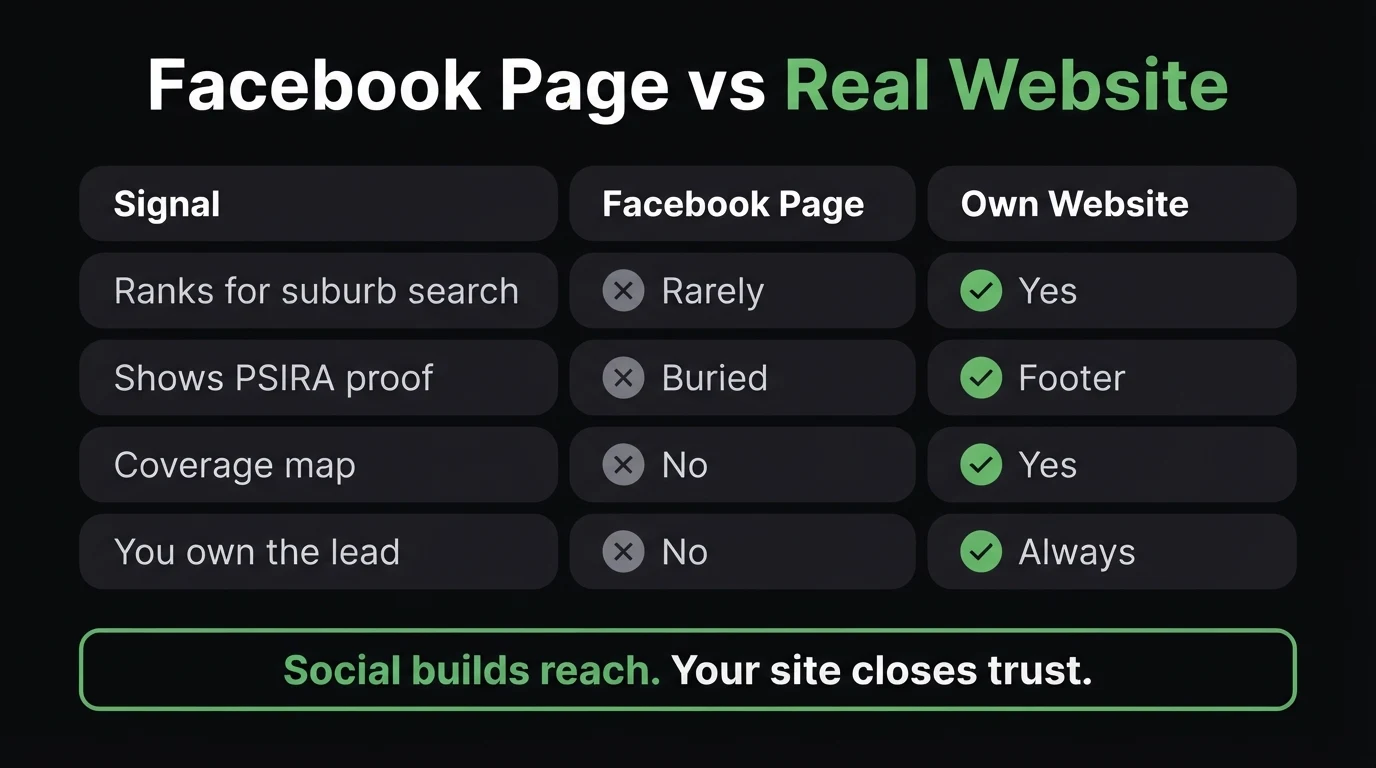
A Facebook page rarely ranks when someone searches "armed response" plus their suburb. Your registration details end up buried in an About tab nobody opens. There's no proper coverage map, no compliance page for commercial buyers, and the platform decides who sees your posts. Most importantly, it doesn't look like infrastructure — and in security, looking like a real, established operation is half the sale. Use social to stay visible in your neighbourhoods; use your website as the place every one of those posts points back to.
In security, the client is buying confidence in a promise they can't test until something goes wrong. Everything on your site should either prove you're legitimate (registration, insurance, real infrastructure) or prove you're capable in their area (coverage, response times, local reviews). Anything that does neither — slogans, stock photos, a vague "contact us" form — is taking up space your proof should be using.
Local Search: Winning "Armed Response Near Me"
Security is one of the most local services there is. A company in Pretoria East can't credibly respond in Randburg, and clients know it. That's good news, because it means a well-built local presence can beat a national brand in its own patch.
Get your Google Business Profile right. For "security company near me" searches, the map pack often sits above the normal results. A complete profile with your branch address, service areas, real photos and a steady flow of reviews is essential — it works alongside your site, not instead of it. Our guide to Google Business Profile vs a website explains how the two fit together.
Build area pages only where you genuinely operate. One honest, specific page per core area — which estates you patrol there, your typical response time, the mix of residential and business clients — beats twenty thin pages that just swap the suburb name. Thin, templated area pages are the kind of thing Google actively devalues.
Answer the questions people ask AI tools. More homeowners now type questions like "what should I check before choosing an armed response company?" into ChatGPT or Google's AI Overviews. Pages that answer clearly, with a short FAQ, are the ones those tools tend to quote — which is exactly why this guide has one at the bottom.
POPIA, CCTV and the Data You Collect
Security companies handle more personal information than most small businesses: client addresses, alarm codes and access details, key-holder contacts, and in many cases CCTV footage. Your website is part of that picture — every quote form collects a name, number and address. You need a proper privacy policy that explains what you collect and why, and your forms should only ask for what you actually need at quote stage. Commercial clients increasingly ask about this during procurement. Our POPIA legal pages guide covers the essentials.
What a Security Company Website Should Include — and What It Can Skip
You don't need a client portal, live tracking or a complicated app integration on day one. Most security businesses get far more from a fast, credible site that nails the trust signals above.
| Feature | Worth it? | Why |
|---|---|---|
| PSIRA details on every page | Essential | The first thing careful buyers look for |
| Coverage map / area list | Essential | Answers "do you cover us?" instantly |
| WhatsApp quote button | Essential | How SA clients make first contact |
| Real team & vehicle photos | Essential | Proves you're an established operation |
| Compliance & documents page | Essential for commercial | Keeps you on procurement shortlists |
| Client portal / live tracking | Later, at scale | Useful, but rarely why a client signs |
At CJX Studios, security company websites sit on the same monthly plans as any other business — the pricing page shows what each tier includes. If you're unsure whether your current site is already costing you enquiries, our checklist of signs your website is losing you customers is a quick self-audit.
The Bottom Line
In most industries, a website helps you look professional. In security, it decides whether you're considered at all. Your clients are buying peace of mind from a stranger, and the industry's reputation means they start out sceptical. The companies that win are the ones that make proof effortless to find: registration up front, honest response times, a clear coverage map, real people and vehicles, and reviews from the neighbourhoods they protect.
Start with the basics this week: put your PSIRA number in your footer, list the areas you actually cover, and swap one stock photo for a real photo of your control room. That alone puts you ahead of most of the competitors your prospects are comparing you against.
- Security is bought on trust, not price. Your site's job is to prove legitimacy and capability before the first call.
- Six signals: PSIRA details, an honest response-time promise, a coverage map, real photos, local reviews, and one-tap WhatsApp.
- Serve both buyers — fast reassurance for homeowners, a compliance page for estates and commercial sites.
Go Deeper: Related Guides
Frequently Asked Questions
Does a security company need a website if it already has a Facebook page?
Yes. Social media is useful for local awareness, but it rarely ranks for searches like "armed response" plus a suburb, it buries your registration details, and it can't hold a coverage map or a compliance page for commercial buyers. Your own website is where prospects verify you're legitimate before they call. Use social for reach and your site for proof.
Should I show my PSIRA registration number on my website?
Yes. The Private Security Industry Regulation Act requires security service providers to be registered with PSIRA, and careful clients check. Put your company registration number in the footer of every page and on your About and Quote pages. It costs nothing, reassures homeowners and procurement officers, and separates you from unregistered operators.
Should a security company publish its response times?
Publish a realistic average for your core areas rather than a best-case number, and say plainly that times vary with traffic and incident load. A specific, achievable promise builds more trust than a vague "rapid response" claim — and missing an exaggerated number does more damage than never making it.
How can a security company rank on Google for its area?
Combine a complete Google Business Profile with genuine reviews and one useful page per area you actually patrol — covering the estates you serve there, typical response times and your client mix. Only build pages for areas you genuinely operate in; thin pages that just swap the suburb name tend to hurt rather than help.
How much does a website for a security company cost in South Africa?
At CJX Studios, security company websites start from R1,200 per month with hosting, maintenance and support included, and no deposit before you approve a free 48-hour live demo. Most security businesses don't need a client portal on day one — a fast site with PSIRA details, a coverage map, real photos, reviews and WhatsApp quote buttons delivers far more value.

Chris Maboyi
I build websites for South African businesses in Centurion, Pretoria and across Gauteng — including service businesses where trust decides the sale, like security, property and professional practices. Every project starts with a 48-hour free demo: real, live, no deposit before you approve it. Get in touch or WhatsApp me directly.