
The First Minute Decides the Shortlist
Picture how your site actually gets used. A procurement officer has six firms to check before a Friday deadline. A developer's PA is building a shortlist of three architects to invite for interviews. A homeowner planning a R2m extension is comparing builders at 10pm. None of them are reading your "our philosophy" paragraph. They are scanning for one thing: have you done work like mine, at my scale, and can I trust you to finish it?
Most architecture and construction sites answer that question badly — not because the work isn't good, but because the site was built to look impressive in a portfolio review rather than to survive a sceptical, time-pressed reader. The fix isn't a redesign. It's a change in what each project page is for.
Show Projects as Case Studies, Not Thumbnails
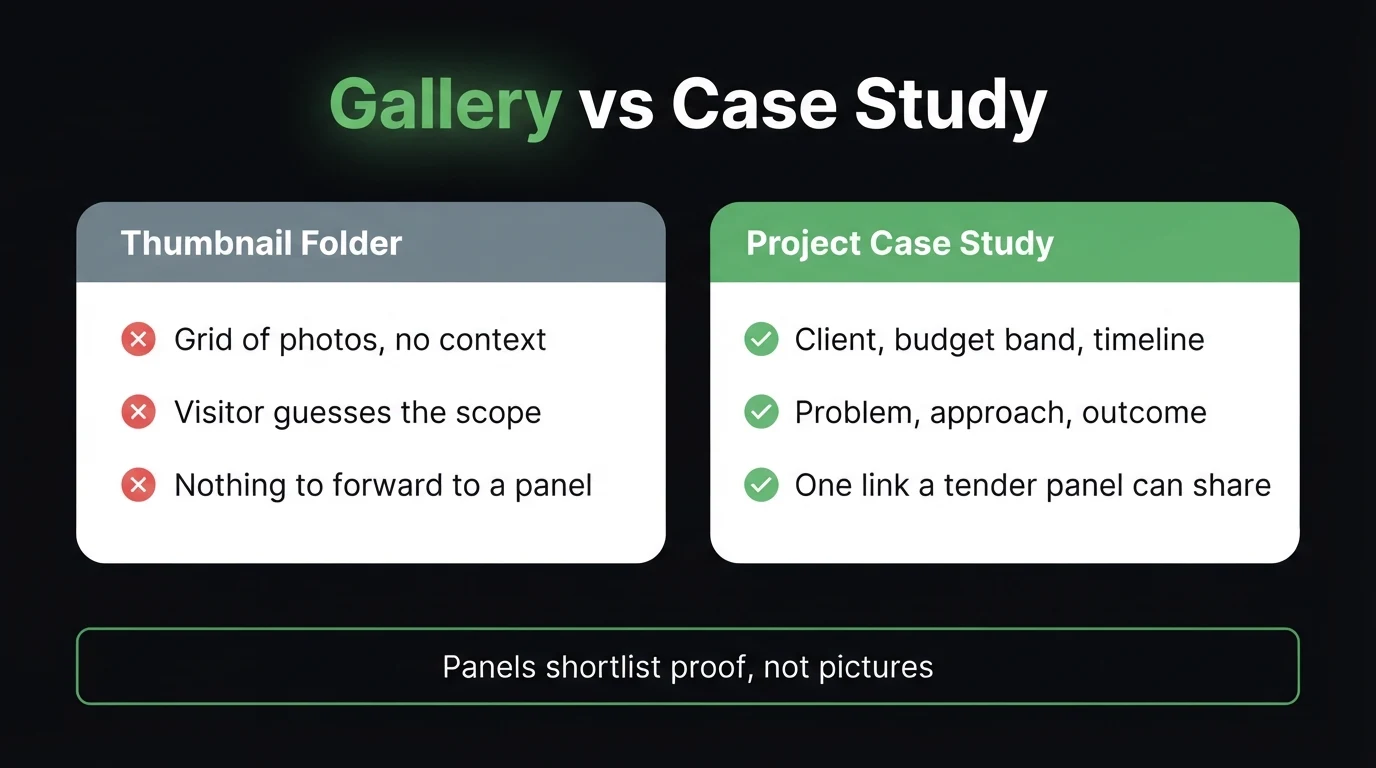
A thumbnail gallery asks the reader to do the work: guess the scope, guess the budget, guess whether it's relevant to them. Most won't bother. A case study does the work for them. The structure is simple and it's the same one every time:
- Client and sector — "Private developer, mixed-use residential" or "Municipal, water infrastructure". Name the client if they'll let you; it's the strongest signal you have.
- Scope and value band — "R8m–R12m contract value, 2 400m² gross floor area". Bands are fine where a client wants discretion; they still show the scale you handle.
- Timeline — start to practical completion, and whether you hit it. "14 months, handed over on programme" is worth more than any hero shot.
- The problem — a sloping site, a heritage overlay, a tight urban boundary, a phased handover while the client kept trading. This is where you show judgement.
- The outcome — what got built, what it cost against budget, and a line from the client if you have one.
Three or four projects documented like this will out-convert a page of forty images every time. If you're briefing a designer on this, our guide to writing a website brief your designer will actually understand has a section on turning a job history into structured project content.
What a Tender Panel Actually Checks For
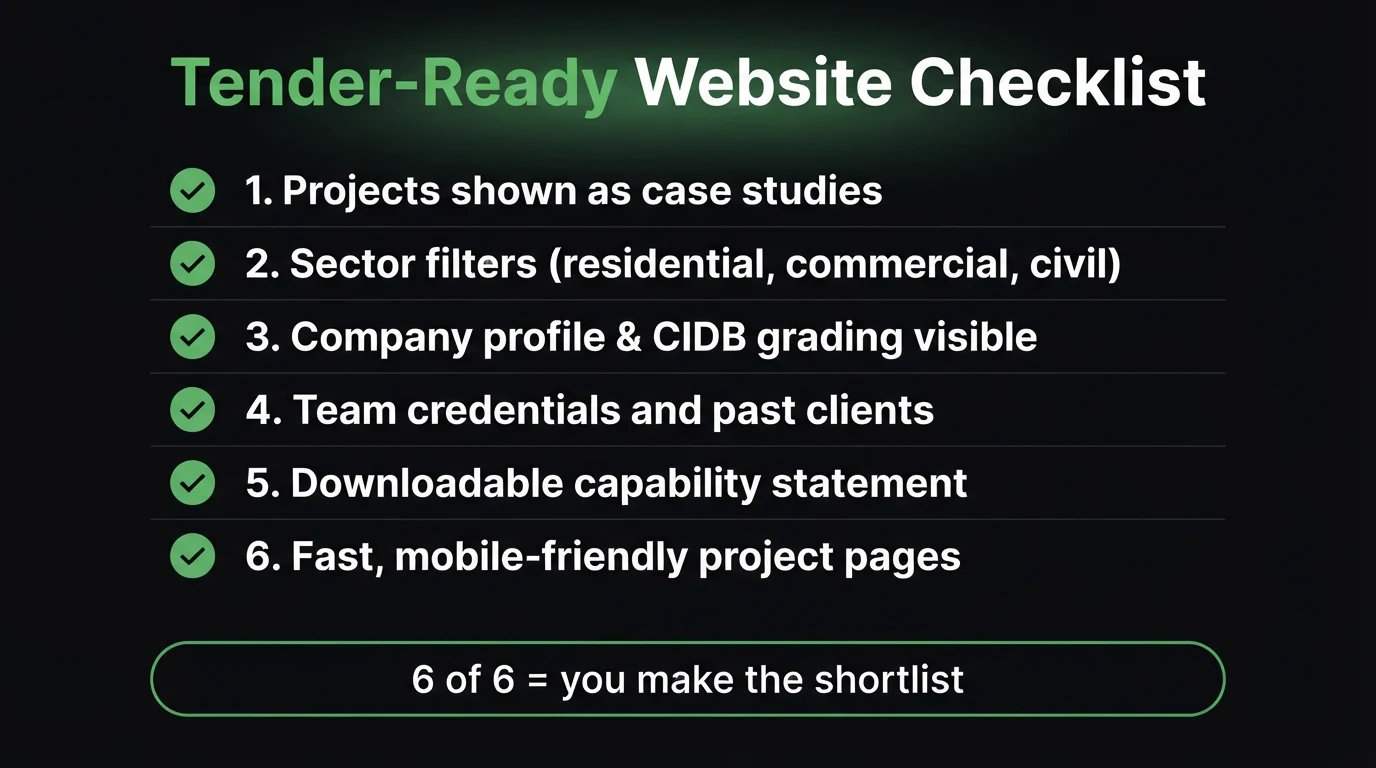
Beyond the projects themselves, there's a checklist running in the reader's head. Miss an item and you plant a doubt — and doubt loses shortlists. Here's what belongs on the site, in plain text, not locked inside a PDF:
- Company profile with registration details — company name, registration number, VAT number, B-BBEE level, and physical address. Procurement checks these first.
- CIDB grading (contractors) — your grade tells a client the contract size you're allowed to tender for. If it's not on the site, they assume the worst.
- SACAP registration (architects) — professional registration numbers for the practice and key staff. The equivalent trust marker for a design practice.
- Team credentials — named people, roles, qualifications, years in the field. "A team of experienced professionals" is not a credential.
- Past clients and sectors served — a logo wall or a plain list. Repeat clients are gold; say so.
- A downloadable capability statement — one clean PDF a panel can attach to an internal email. Most firms don't have one on the site. It's an easy win.
- Fast, mobile-friendly project pages — half of these checks happen on a phone between meetings. If your gallery takes six seconds to load, see our piece on Core Web Vitals and why Google — and your reader — punish a slow site.
Across the architecture and construction sites we've built and audited around Centurion, Pretoria and Johannesburg, the same gap shows up. The work is genuinely good. The site has a striking homepage image and a portfolio page — but the portfolio is a scrollable grid with no client names, no values, no timelines, and no way to tell a civil project from a private house. The firm is competing for R10m tenders with a page that looks like an interior-design mood board. Rebuilding the same photos into five proper case studies, adding a company profile with the CIDB grade in plain sight, and attaching a one-page capability statement changes how the site is used — from something a panel glances at to something they forward internally.
Open your own project page on your phone right now. Could a stranger tell, in ten seconds, what you built, for whom, and at what scale?
The Pages an Architecture or Construction Site Needs
You don't need a big site. You need a small number of pages that each do a clear job. Here's how we'd prioritise them, ranked by impact against effort — because not everything deserves equal attention this month:
| Page | The job it does | Priority |
|---|---|---|
| Projects / Case Studies | Proves you've delivered work at the reader's scale and sector — the page that wins or loses the shortlist | Critical |
| Company Profile | Registration numbers, CIDB grade or SACAP registration, B-BBEE level, address — what procurement verifies first | Critical |
| Capability Statement (PDF) | One clean document a panel can forward internally without rewriting anything | High |
| Sectors / Services | Lets a reader filter to "civil", "commercial" or "residential" and see they're in the right place | High |
| Team / About | Named people with real qualifications — turns an abstract firm into people a client can trust | Medium |
| Contact / Enquiry | Direct line, email, WhatsApp, and a short form for tender invitations — no generic "info@" black hole | Medium |
| Full brand rebuild | Only worth it if the current site is unmaintainable or off-brand — content comes first | Low |
If you want to see how this looks as a live commercial page, we've built dedicated versions for architecture practices in Centurion and construction firms in Pretoria — same case-study-first structure, tuned to how each type of client searches and shortlists.
Get a project portfolio built to win tenders, not just look good on a wall.
Send Chris photos and a short brief on three or four completed jobs, plus your company details. See a live demo — case-study layout, sector filters, company profile with your CIDB grade, a capability statement ready to download — before you pay anything.
Zero deposit · No lock-in · Pay only if you approve it · From R1,200/mo
What Most Architecture and Construction Sites Get Wrong
- Portfolio is a photo grid — no client, no value, no timeline, no context
- Credentials hidden — CIDB grade or SACAP number missing or buried in a PDF
- No capability statement — nothing a panel can forward without rewriting it
- Generic contact form that lands in an inbox nobody checks daily
- Slow, heavy image pages that stall on a phone between meetings
- Case studies with client, sector, value band, timeline, problem, outcome
- Company profile with registration details and grading in plain text
- Downloadable capability statement, kept current
- Direct contact — named person, phone, WhatsApp, tender-enquiry form
- Fast project pages that open cleanly on mobile
How CJX Studios Builds Sites for Architects and Construction Firms
Every site we build for a design practice or a contractor starts with the project content, not the colour palette. We take your completed jobs and turn each into a structured case study — client, sector, value band, timeline, the problem, the outcome — then build sector filters over the top so a reader can jump straight to work like theirs. The company profile carries your registration details and CIDB grading or SACAP number in plain text, and we set up a one-page capability statement a panel can download and forward. It's built mobile-first and fast, because most of the checking happens on a phone. If your current site is a striking image with a thumbnail gallery behind it, that's the first thing we'd change. This is the same approach we use for the trades in our guide to websites for plumbers and electricians — different buyer, same principle: prove the work, remove the doubt.
Go Deeper: Related Guides
Frequently Asked Questions
What should be on the homepage of an architecture or construction firm's website?
Within the first screen: what you build, who you build it for (residential, commercial, civil), and one line of proof — a marquee project, a client name you can show, or your CIDB grading. A tender panel or private client decides in about a minute whether to keep reading, so lead with capability and credibility, not a stock photo of a skyline.
How many projects should I show in my portfolio?
Six to ten projects presented properly beat forty thumbnails. Each one should read as a short case study: client and sector, scope and value band, timeline, the problem you solved, and the outcome. A panel is looking for evidence you have delivered work like theirs before — not a gallery to scroll.
Do I need to show my CIDB grading or SACAP registration on the site?
Yes. For construction firms, your CIDB grade tells a client the size of contract you are legally allowed to take on, and it is one of the first things a procurement officer checks. For architects, SACAP registration is the equivalent trust marker. Put these in the footer and on your company profile or about page, in plain text, not buried in a PDF.
Should project pages include budget and value figures?
Use value bands rather than exact figures where a client has asked for discretion — for example "R8m–R12m contract value" instead of a precise number. Bands still signal the scale of work you handle, which is the point, without breaching a confidentiality clause. If a client is happy to be named and quoted, that is stronger still.
How fast can CJX Studios build a site like this for my firm?
The live demo is ready within 48 hours of you sending through project photos, a short brief on three or four completed jobs, and your company details. You review the real page — case-study layout, sector filters, capability statement — before paying anything. No deposit until you approve it, from R1,200/mo.
- Case studies beat thumbnails: client, sector, value band, timeline, problem, outcome — on every project.
- Put credentials in plain text: CIDB grade, SACAP number, registration and B-BBEE details where procurement can see them.
- Add one capability statement PDF a panel can forward internally — most firms don't have one on the site.
Keep Reading

Chris Maboyi
I build websites for South African architecture practices and construction firms across Centurion, Pretoria and Johannesburg — case-study-first portfolios that stand up to a tender panel, not just a portfolio review. Every site starts with a 48-hour free demo: real, live, no deposit. Get in touch or WhatsApp me directly.