Why New Websites Lose Rankings (and Why Yours Doesn't Have To)
Google does not rank your business. It ranks individual pages at specific addresses. When your /services/geyser-repairs page has been ranking for three years and the new site moves it to /geysers, Google sees one page disappear and a brand-new, unproven page appear. Every backlink, every bit of history attached to the old address, is left pointing at a 404 error.
That is the whole problem in one sentence. A migration goes wrong when nobody tells Google where things moved. The fix is unglamorous: an inventory, a redirect map, and a careful launch. Done properly, most sites hold their positions, and many climb once the faster, cleaner new pages settle in.
First, Know Which Kind of Migration You're Doing
"New website" means different things, and the risk level changes with each. Be clear which of these applies before anyone touches the design:
| Migration type | What changes | SEO risk |
|---|---|---|
| Redesign only | Look and layout; same URLs and domain | Low, if content and titles stay |
| Platform switch | e.g. WordPress or Wix to a custom build | Medium: URL patterns often change |
| URL restructure | Page addresses and site structure | Medium to high: every URL needs a redirect |
| Domain change | e.g. .com to .co.za, or a rebrand | High: the whole site moves address |
| HTTP to HTTPS | Security certificate added | Low, with site-wide redirects |
Many South African small businesses do three of these at once: a rebrand, a new .co.za domain and a move off an old builder. That is fine, but it means the checklist below is not optional.
The Pre-Launch Checklist: Protect What's Already Working
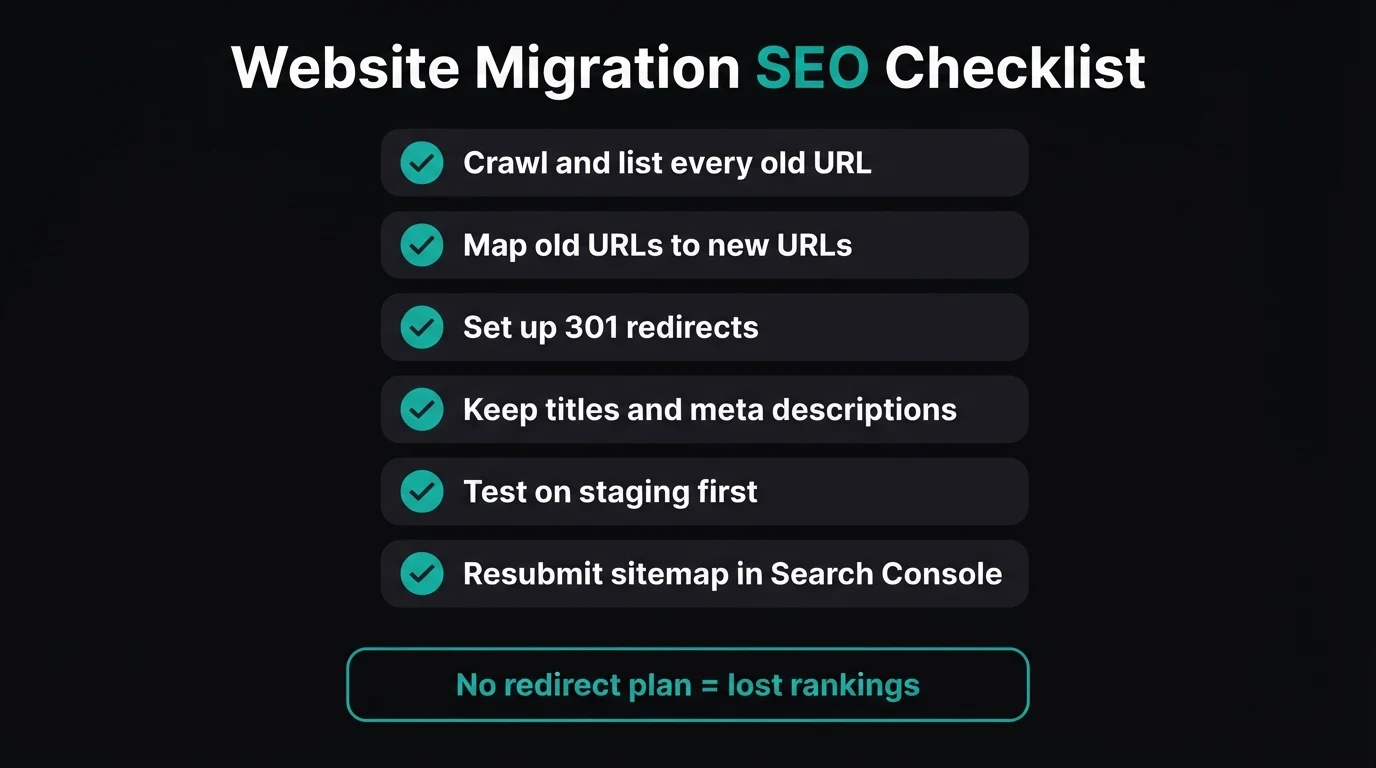
Benchmark before you change anything
Export the last three to six months from Google Search Console: top pages, top queries, clicks and positions. Note your Google Analytics enquiry numbers too. Without a "before" picture, you cannot tell a normal post-launch wobble from a real loss.
List every URL on the old site
Use a crawler (Screaming Frog's free version covers 500 URLs), your old sitemap, and the Search Console pages report. Include PDFs, image URLs that get traffic and old blog posts. The page you forget is usually the one with the backlink from a supplier or the local newspaper.
Flag your money pages
Mark the 10 to 20 pages that bring the most clicks, the most enquiries, or have backlinks. These get the most care: same topic, same depth of content, ideally the same URL. Cutting your best-ranking service page down to two lines "because the new design is cleaner" is the most common self-inflicted ranking loss we see.
Build a redirect map
A simple spreadsheet: old URL in column A, new URL in column B. Every old URL must point to its closest relevant new page, not the homepage. Redirecting everything to the homepage is treated by Google much like a 404, so the authority does not carry across.
Keep the on-page SEO that earned the rankings
Carry over title tags, meta descriptions, H1s, internal links and the substance of the content on ranking pages. You can improve them, but improve, don't erase. If a title has ranked well for years, change it carefully and one page at a time.
Build and test on a staging copy
Build the new site on a private staging address, blocked from Google with a noindex tag or password. Then test the redirect map, forms, WhatsApp buttons, phone links and mobile layout before a single customer sees it.
Remove the staging noindex tag and robots.txt block when you go live. It sounds obvious, yet a forgotten "discourage search engines" setting is one of the most common reasons a freshly launched site vanishes from Google entirely. Check the live page source on launch day, not the next month.
301 Redirects, Explained Without the Jargon
A 301 redirect is a forwarding address. When Google or a visitor requests the old URL, the server answers "this has moved permanently, go here instead" and sends them to the new page. Google then transfers the old page's ranking signals to the new one over the following weeks.
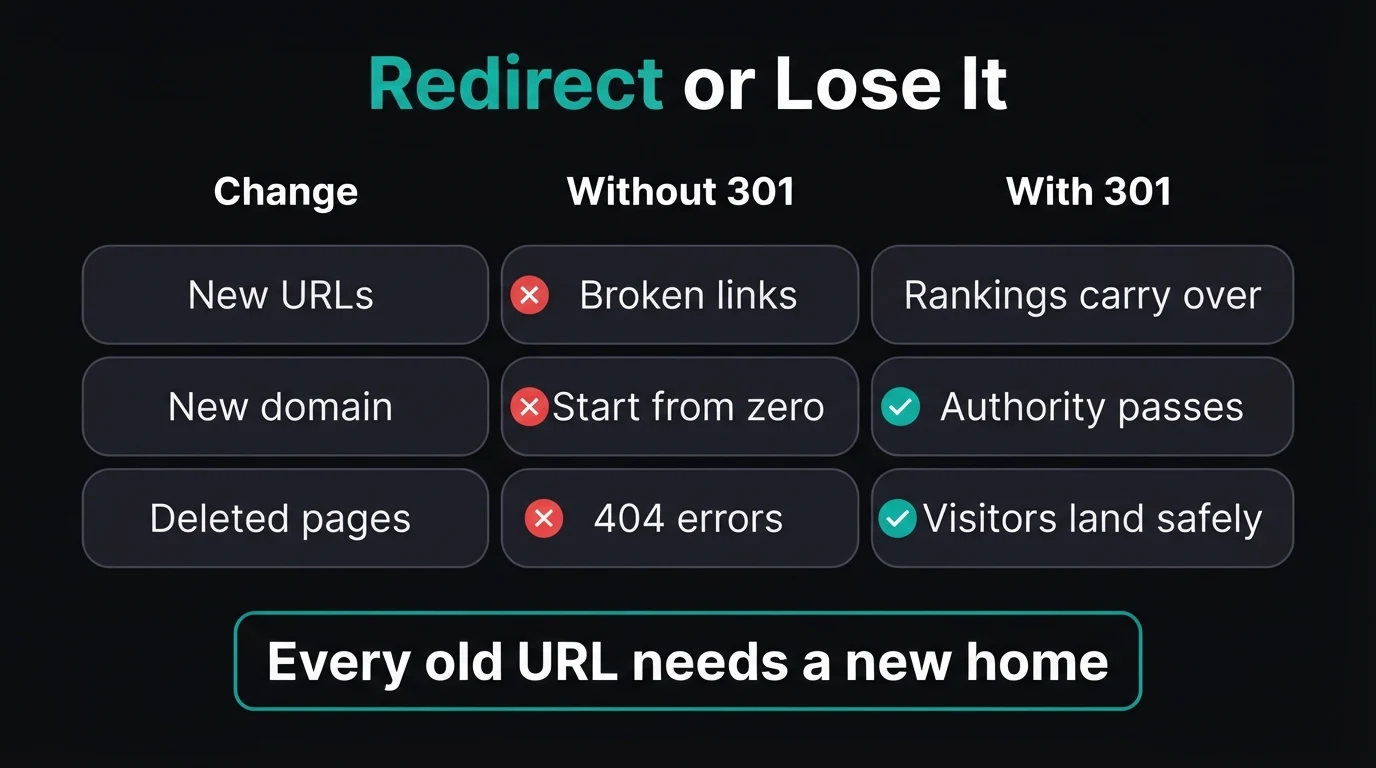
- Use 301 (permanent), not 302 (temporary) redirects
- Redirect old pages to the closest matching new page
- Redirect each URL in one hop, not chains of three or four
- Keep redirects live for at least a year, ideally permanently
- Send every old URL to the homepage
- Let your old domain or hosting lapse straight after launch
- Delete pages that still earn traffic without a replacement
- Rely on a "custom 404" page as your redirect plan
If you are changing domains, keep paying for the old domain. Letting it expire breaks every redirect at once, and someone else can register it. A domain costs a couple of hundred rand a year; losing your history costs far more.
Quick check: do you know which five pages on your current site bring in the most enquiries?
Launch Day and the First 30 Days
Go live, then test the redirects on the real domain
Spot-check your top 20 old URLs in a browser and confirm each lands on the right new page in one hop. Run a crawl of the old URL list to catch any 404s. Fix those the same day.
Tell Google
Submit the new XML sitemap in Search Console and use URL Inspection to request indexing of your most important pages. On a domain change, also use Search Console's Change of Address tool. Update your Google Business Profile website link, plus directory listings and social bios.
Watch, compare, fix for 30 days
Check the Search Console pages report weekly for "Not found (404)" and "Page with redirect" issues. Compare clicks and positions against your benchmark. Some movement in the first two to six weeks is normal; a steady slide on one specific page usually points to a missing redirect or thinner content on that page.
Speed is part of this too. A migration is the ideal moment to fix slow pages, because the new build is usually leaner. Our Core Web Vitals guide explains what Google measures and how to check it.
Planning a redesign? Let's protect your rankings first.
Every CJX rebuild includes a URL inventory, a redirect map and post-launch Search Console checks. You see a live demo of the new site in 48 hours, and pay nothing until you approve it.
Zero deposit · No lock-in · Based in Centurion, serving all of SA
Questions to Ask Your Web Designer Before You Sign
Plenty of good-looking websites are launched by designers who never mention SEO. Before you approve a quote for a redesign, ask:
- "Will you keep my existing URLs, or set up 301 redirects for every page that changes?" Any answer other than a confident yes is a red flag.
- "Who handles the redirect map and checks for 404s after launch?" It should be a named step in the project, not an afterthought.
- "Will my ranking pages keep their content and titles?" A designer who wants to cut your best page to a single paragraph needs to justify it.
- "Do I get access to Search Console and Analytics?" You should own your data, before and after.
- "What happens to my old domain and hosting?" Both need to stay active long enough for redirects to do their job.
If you already relaunched and traffic dropped, it is usually recoverable. Start with the Search Console 404 list, add the missing redirects, and restore any thin content on pages that used to rank. Our guide on why a business isn't showing on Google walks through the other common causes.
The Bottom Line
A new website should be an upgrade for your search visibility, not a reset. The design is rarely what costs rankings; lost URLs, missing redirects and gutted content are. Inventory every page, map every redirect, keep what earned your positions, test on staging, and watch Search Console closely for a month. Do that, and the new site gets to build on years of work instead of starting from scratch.
- Map every old URL to its closest new page with a 301 redirect, never a blanket homepage redirect.
- Keep what ranks: titles, headings and content on your best pages carry the rankings.
- Resubmit your sitemap and check Search Console weekly for 30 days after launch.
Go Deeper: Related Guides
Frequently Asked Questions
Will a new website affect my Google rankings?
It can, but it does not have to. Rankings drop after a redesign mainly when page URLs change without 301 redirects, when ranking content is cut or rewritten, or when the new site is accidentally blocked from Google. If you keep your URLs or redirect each one to its closest new page, preserve your titles and content, and resubmit your sitemap, most sites hold their positions and often improve.
How long does it take to recover rankings after a website migration?
A well-planned migration usually sees some movement for two to six weeks while Google recrawls the site and processes the redirects. A domain change can take longer, sometimes a few months. If rankings are still falling after six weeks, check Search Console for 404 errors, missing redirects and pages that lost content, because those are the usual causes.
Should I redirect all my old pages to the homepage?
No. Google treats a blanket homepage redirect much like a missing page, so the old page's ranking value does not carry over and visitors land somewhere irrelevant. Redirect each old URL to the closest matching new page. Only redirect to the homepage when there is genuinely no related page on the new site.
Do I need to keep my old domain after moving to a new one?
Yes. Keep the old domain registered and the redirects running for at least a year, and ideally permanently. If the old domain expires, every redirect stops working at once, backlinks break, and someone else could register it. Renewing a domain costs far less than rebuilding lost search visibility.
Can I change my website platform without losing SEO?
Yes. Moving from WordPress, Wix or another builder to a custom-built site is safe if you map every old URL to a new one, set up 301 redirects, carry over titles, meta descriptions and content, and test on a staging copy before launch. The platform matters far less than how carefully the move is planned.

Chris Maboyi
I build websites for South African businesses in Centurion, Pretoria and across Gauteng, and run an AI-assisted content and SEO programme for CJX Studios. Every project starts with a 48-hour free demo: real, live, no deposit before you approve it. Get in touch or WhatsApp me directly.