So the Site Is Live. What Actually Changes?
Launch day feels like the finish line. The design is signed off, the pages load, the contact form sends a test email, and everyone breathes out. Then the designer says "you're live" and the emails go quiet.
Here is the honest version: going live is the moment your website starts working, not the moment your job with it ends. A live site sits on a server that gets updated, behind a domain that expires, running software that needs patching, in front of customers whose questions change every few months. Leave all of that alone for a year and the site does not stay frozen in its launch-day state — it slowly slides backwards.
None of this is dramatic or expensive. But nobody walks you through it, so most business owners find out the hard way: a "not secure" warning in Chrome, a contact form that stopped emailing in March, or a domain that lapsed while everyone was on December leave. This guide is the walk-through.
The Five Jobs That Never Stop
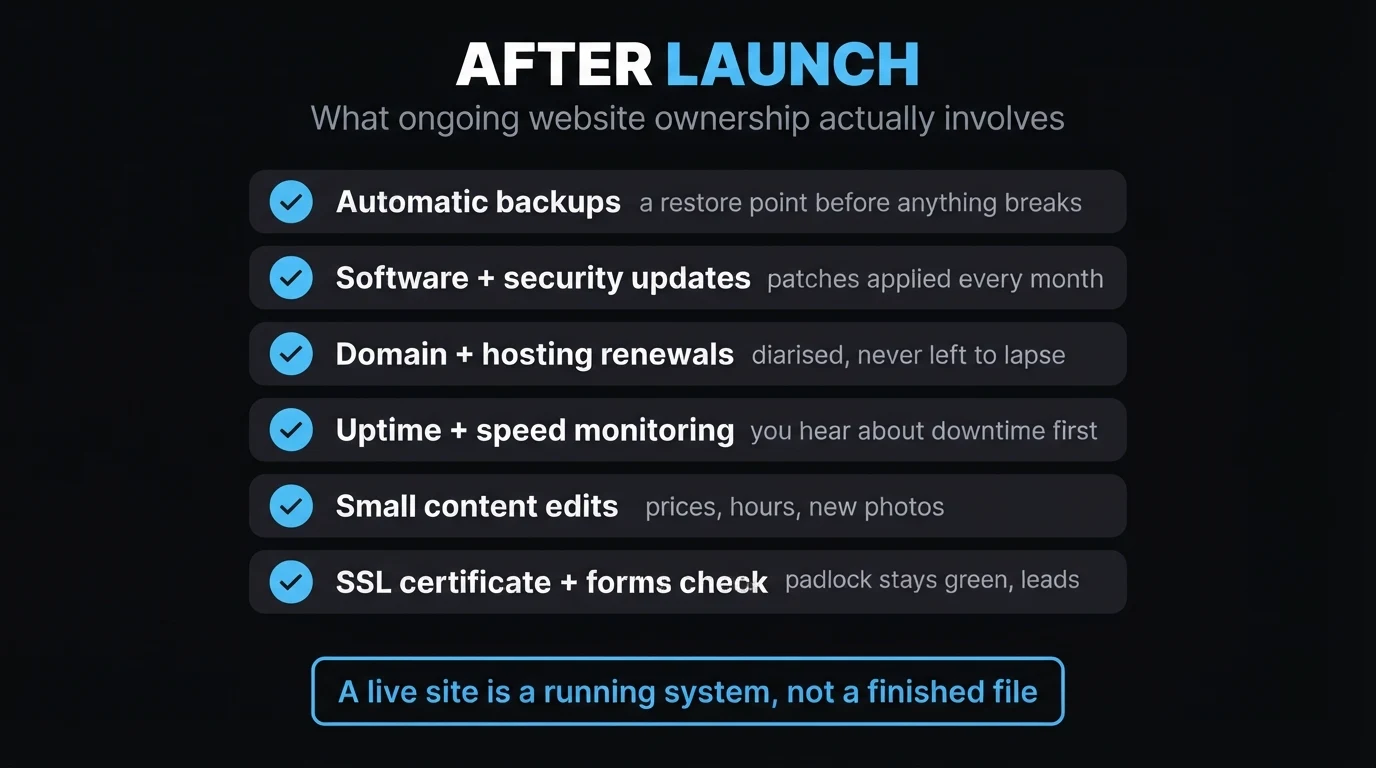
Every live website needs these five things to keep happening in the background. Whether you pay someone or do it yourself, the list does not change.
1. Backups — a restore point before anything breaks
A backup is a saved copy of your whole site — files and database — that you can roll back to if something goes wrong. And things do go wrong: a bad edit, a failed update, a hosting glitch, occasionally a hack. Without a recent backup, "fix it" can mean "rebuild it". A sensible setup takes an automatic off-site backup at least weekly, keeps a month or so of history, and — this is the part people skip — gets tested once in a while so you know the restore actually works.
2. Software and security updates
Whatever your site is built on has moving parts: a CMS, a theme, plugins, server software. Updates fix bugs and, more importantly, close security holes that attackers actively scan for. The risk is not that an update might break something (occasionally it does, which is why point 1 exists) — the risk is leaving known holes open for months. A monthly patching rhythm, with a backup taken first, keeps you off the easy-target list. If you want the fuller picture on how neglected sites get compromised, we covered the warning signs a website has been hacked separately.
3. Domain and hosting renewals
Your domain (the name) and your hosting (the space it lives in) are separate subscriptions, often on different dates, sometimes with different providers. Miss the hosting renewal and your site — and frequently your email — goes dark until you pay and it is restored. Miss the domain renewal and, after a grace period, the name can be registered by anyone, including squatters who will happily sell it back to you at ten times the price. Auto-renewal plus a card that is not about to expire plus a calendar reminder 60 days out makes this a non-issue.
4. Uptime and speed monitoring
You should not find out your site is down because a customer phoned to tell you. A basic uptime monitor checks the site every few minutes and alerts you the moment it stops responding. Speed matters too — pages that creep past two or three seconds lose visitors and slip in Google's rankings. It is worth understanding what Core Web Vitals are, because those are the exact speed numbers Google measures.
5. Small content edits
Your prices change. Your trading hours shift for the festive season. You add a service, drop one, take on a new team member, finish a project worth showing off. Each of those is a five-minute edit — but only if someone actually makes it. A site that still shows last year's pricing and a staff member who left quietly tells visitors you are not paying attention.
Doing It Yourself vs Having It Managed
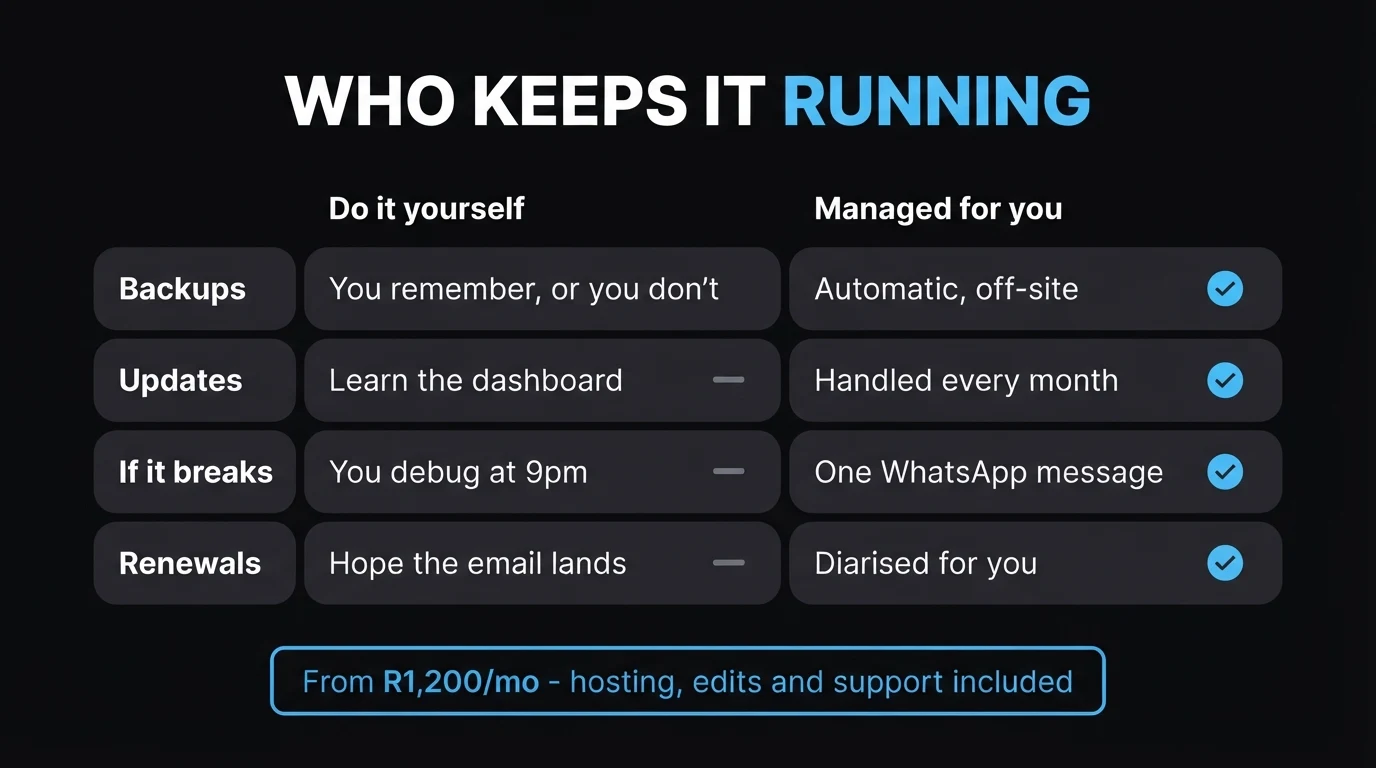
There is nothing wrong with self-managing a website. The question is whether you will actually keep it up once the novelty wears off and the business gets busy. Be honest with yourself here — an unmaintained site is worse than an unglamorous one.
- Are comfortable in a hosting control panel and a CMS dashboard
- Will genuinely diarise renewals and monthly update time
- Have a backup tool running and have tested a restore
- Know who you would call if the site went down on a Friday night
- Keep your own domain registrar login under your control
- Would rather send a WhatsApp than learn a dashboard
- Have been burned before by a lapsed renewal or a missing backup
- Want edits done same-week without hiring hourly each time
- Need someone accountable when something breaks
- Value the time back more than the rand saved
For a plain-English breakdown of what monthly plans actually include versus a once-off build, our guide on once-off vs monthly website packages in South Africa runs the three-year numbers side by side.
The Renewals That Catch People Out
Of the five jobs, renewals are the one that most often turns into a real problem — because a missed backup is invisible until you need it, but a missed renewal takes the whole site offline in one go.
| What renews | Typical cycle | What happens if it lapses |
|---|---|---|
| Domain name | 1–2 years | Site stops resolving; after a grace period the name can be taken by anyone |
| Hosting | Monthly or annual | Site and often email go offline until paid and restored — can take a day or more |
| SSL certificate | Auto, or annual | Browsers show a "not secure" warning; some visitors leave immediately |
| Business email plan | Monthly or annual | Sending and receiving stops; missed enquiries you never see |
The pattern I see most often is the December lapse. A business closes for the year, a renewal invoice lands in an inbox nobody is checking, and the card on file expired in November. Everyone comes back in January to a dead site, a scramble to reach support over the holiday skeleton staff, and a week of lost search visibility right when competitors are back online. It is completely avoidable — auto-renewal, a live card, and a reminder set 60 days ahead — but it needs someone to have set it up on purpose.
Quick check: do you know, right now, what date your domain renews and whose name it is registered in? If not, that is the first thing to sort out this week.
What a Good Handover Should Include
Before you accept "you're live" as the end of the project, make sure you have been handed the things that let you — or the next person — actually run the site.
Your domain, in your name
The domain must be registered to you or your company, with the registrar login under your control. Not your designer's account. This is the single most important thing you own.
Hosting details and access
Where the site is hosted, the plan, the renewal date, and admin access — even if your care plan means you never log in yourself.
A written answer to "what do I keep if I leave?"
If the site is on the provider's servers, what happens if you stop paying? Get the answer in writing before launch, not after a dispute.
Analytics and Search Console connected
Google Analytics and Google Search Console set up and pointed at your property, so there is data from day one rather than starting the clock months later.
A backup running, and a support route
Confirmation that automatic backups are on, and a clear channel — a number, a WhatsApp, an email — for when something needs fixing.
Not sure what you were actually handed at launch?
Send us your domain and we will tell you where it is registered, when it renews, whether SSL and backups are in place, and what is missing — no charge, no obligation.
Zero deposit · No lock-in · Based in Centurion, serving all of SA
When Something Breaks: Who Do You Call?
Everything above is prevention. This is the part for when prevention was not in place. If your site goes down, your form stops sending, or a "not secure" warning appears, the speed of the fix depends entirely on what you arranged beforehand.
- On a care plan: one message to your designer or agency, and a business-critical issue should be looked at the same day.
- Once-off build, no arrangement: you are calling around for someone available, briefing them from scratch, and paying an hourly rate that is higher precisely because it is urgent and unfamiliar.
- DIY, no plan: you are debugging it yourself, at night, with the business offline the whole time.
Downtime is expensive in a way that does not show on an invoice — it is the enquiries that went to a competitor while your site was unreachable. Load-shedding makes this worse if your setup is fragile; we wrote about how load shedding quietly takes SA websites offline and how to harden against it.
The Bottom Line
A website is not a poster you print once and pin up. It is closer to a vehicle: it does its job for years, but only if it gets serviced, fuelled and licensed on time. The five jobs — backups, updates, renewals, monitoring, edits — are the service schedule. You can run that schedule yourself or hand it to someone, but you cannot skip it and expect the site to keep performing.
If you would rather not think about any of it again, that is exactly what a care plan is for. And if you are still deciding whether your current site is even worth maintaining, start with our pricing page or just get in touch for a straight answer.
- Going live is the start, not the finish. A live site is a running system that needs backups, updates, renewals, monitoring and small edits to keep working.
- Renewals are the biggest trap. A lapsed domain or hosting bill takes the whole site — and often your email — offline in one go. Auto-renew, keep a live card, set a 60-day reminder.
- Decide upkeep before you need it. Self-manage only if you will genuinely keep up; otherwise a care plan from R1,200/mo covers all five jobs, with edits and support included.
Go Deeper: Related Guides
Frequently Asked Questions
What do I need to do after my website goes live?
Five things need to keep happening: take regular backups, apply software and security updates, renew your domain and hosting on time, watch for downtime and slow load times, and make small content edits as your prices, hours or services change. On a managed care plan these are done for you. On your own, set aside a couple of hours a month and diarise every renewal date with a reminder well in advance.
Do I really need to pay for website maintenance every month?
You do not have to, but an unmaintained site tends to drift: it slows down, plugins fall behind, forms break quietly, and an expired SSL certificate scares visitors away. A monthly plan spreads the cost of hosting, updates, backups and small edits so nothing piles up. If you prefer to self-manage, budget for hosting, a backup tool and your own time — and be honest about whether you will actually keep up with it once the business gets busy.
What happens if my domain or hosting expires?
If hosting lapses, your site and often your email go offline until you pay and the service is restored, which can take a day or more. If the domain itself lapses, the site stops resolving and, after a grace period, anyone can register the name — including squatters who then resell it to you at a large mark-up. Both are avoidable with auto-renewal, a card that is not about to expire, and a calendar reminder 60 days out.
Who fixes my website if something breaks after launch?
Whoever you have an agreement with. On a care plan, that is your designer or agency, and the fix should start the same day for anything business-critical like a down site or a broken contact form. If you had a once-off build with no ongoing arrangement, you are on your own unless you call someone in ad hoc — which is slower and usually more expensive per hour. Agree this before launch, not during an outage.
How much should website upkeep cost in South Africa?
For a standard small business website, ongoing care runs roughly R800 to R3,500 a month depending on what is included. CJX Studios starts from R1,200/mo with South African hosting, SSL, backups, security updates, on-page SEO upkeep, small content edits and priority support bundled in. A bare self-managed setup can be cheaper in rands but costs you time and carries more risk if a renewal or a backup is missed. See our full website cost breakdown for the wider picture.

Chris Maboyi
I build and look after websites for South African businesses in Centurion, Pretoria and across Gauteng — domain, hosting, SSL, design, SEO, and the ongoing care that keeps a site working after launch. Every project starts with a 48-hour free demo: real, live, no deposit before you approve it. Get in touch or WhatsApp me directly.